Home Office Ideas: Desk Organization Tips and Office Desk Inspiration
Working from home has turned the desk from a spare surface into the command center of the day, and that shift makes thoughtful design more important than ever. The right setup can improve comfort, reduce clutter, and support deeper focus, whether you work in a separate room or at one end of the dining table. This article explores practical layout ideas, dependable organization methods, and creative desk inspiration so your workspace feels efficient, personal, and easier to maintain over time.
Outline
This article is organized into five parts so you can move from planning to styling without losing the practical details.
-
Choosing the right location, layout, and furniture for a productive home office
-
Building desk organization systems that stay useful after the first week
-
Finding office desk inspiration across different design styles and room sizes
-
Improving comfort with lighting, ergonomics, and smart accessories
-
Bringing everything together with a realistic plan for everyday work at home
1. Planning a Home Office That Works in Real Life
A good home office begins with a simple question: what kind of work actually happens here? The answer matters more than color palettes or trendy shelving. Someone who spends six hours on video calls needs a different setup from a designer using dual monitors, and both need something different from a student managing notes, books, and a laptop. Function should come first, because a beautiful workspace that interrupts your workflow quickly becomes frustrating. In that sense, the best home office ideas are not always dramatic; often, they are quiet decisions that remove small daily obstacles.
Start with location. A dedicated room is ideal, but many people work from a bedroom corner, hallway niche, or living room wall. When space is limited, boundaries become more important than square footage. A slim desk, a rug, a lamp, or even a narrow bookcase can visually separate work from home life. That separation matters psychologically. Environmental design research has long suggested that visible cues influence attention and behavior, which helps explain why a defined workspace often makes it easier to focus. In practical terms, when your laptop lives among folded laundry, unfinished mail, and yesterday’s coffee mug, your brain receives too many competing signals.
Desk size is another foundational choice. A compact desk around 40 to 48 inches wide can work well for laptop users, while larger setups benefit from 55 inches or more. Standard desk height usually falls between 28 and 30 inches, which suits many adults, though chair adjustment and monitor position matter just as much. If you need flexibility, a sit-stand desk can be useful, especially for long workdays. The key advantage is variation rather than constant standing. Changing posture across the day can ease stiffness and reduce that familiar afternoon slump when everything feels one email too heavy.
When comparing layouts, think in zones:
-
Main work zone for computer, keyboard, and writing space
-
Reference zone for notebooks, planners, and documents
-
Support zone for printer, charging dock, or storage bins
This approach keeps essential tools within reach while moving secondary items out of the immediate work area. It also helps small spaces feel calmer. A desk should not have to do every job at once. If possible, place the surface near natural light, but angle the screen to reduce glare. A window to the side is often easier to work with than one directly behind the monitor.
In the end, practical planning gives style something solid to stand on. Before adding art, lamps, or decorative trays, make sure the desk supports your schedule, the chair fits your body, and the room reduces distraction rather than manufacturing it. That is the difference between a workspace that photographs well and one that genuinely earns its place in your day.
2. Desk Organization Tips That Stay Useful Beyond Day One
Desk organization is often treated like a one-time makeover, but the better approach is to build a system that survives real use. A tidy desk on Sunday evening means very little if by Wednesday it has become a museum of receipts, sticky notes, chargers, pens that may or may not work, and a lonely paper clip performing no visible function. The goal is not perfect minimalism. The goal is friction reduction: fewer searches, fewer visual distractions, and fewer moments when a simple task turns into a scavenger hunt.
The first rule is to organize by frequency, not by category alone. Items you use several times a day should stay in the primary reach zone, usually within an arm’s length while seated. This includes pens, a notebook, your headphones, and perhaps a water bottle if spills are unlikely. Weekly-use items, such as stamps, spare cables, or specialty stationery, can move into drawers or labeled containers. Rarely used objects should leave the desk entirely. That last step is where many setups improve dramatically. Just because something belongs to your work life does not mean it belongs on the desk surface.
Open storage and hidden storage each have strengths. Open trays make access easy and encourage consistency when tools need to go back quickly. Drawers reduce visual noise and help a room feel cleaner, especially in shared spaces. If you compare the two, open storage supports speed, while closed storage supports calm. A balanced setup often uses both. For example, a document tray for current papers and a drawer divider for office supplies can work together better than either would alone.
Cable management deserves more attention than it usually gets. Tangled cords make a desk feel chaotic even when everything else is in place. They also collect dust and complicate cleaning. A few basic tools can solve most of the problem:
-
Velcro ties for bundling extra cable length
-
Adhesive clips to guide charging cords to the desk edge
-
A cable box or under-desk tray to hide power strips
-
Labels for chargers that otherwise look identical
Paper is another common troublemaker. If you still handle physical documents, create a simple decision path: action, reference, archive, recycle. Without those categories, paper tends to settle like weather. A small vertical file can keep current projects sorted without covering your work area. Digital clutter matters too. Matching physical order with a basic file naming system and a clean desktop screen can make the entire workflow smoother.
One of the most effective habits is the two-minute reset. At the end of the workday, spend two minutes returning objects to their places, clearing cups, and reviewing what needs to stay visible for tomorrow. It is almost boring in its simplicity, which is exactly why it works. Organization rarely fails because people lack containers; it fails because the system is too complicated to repeat. Choose tools that support your actual routine, not an imaginary version of yourself who color-codes every paperclip and never leaves a note in the wrong spot.
3. Office Desk Inspiration for Different Styles, Spaces, and Personalities
Office desk inspiration becomes much more useful when it moves beyond trend lists and starts reflecting how people live. A workspace should feel motivating, but that does not mean it needs to look identical to a showroom or social media post. The most memorable desks often mix function with a sense of identity: a clean oak surface with one sculptural lamp, a wall-mounted shelf above a compact workstation, or a vintage chair paired with modern tech. Think of the desk as a stage set for your working mind. Every object can either support the scene or pull the audience out of it.
If you like a minimalist look, the appeal is usually clarity. Neutral tones, concealed storage, and limited accessories can make the mind feel less crowded. This style works especially well in small rooms because visual simplicity creates a sense of openness. A white or light wood desk with a black task lamp, a single framed print, and one tray for essentials can feel sharp without being cold. The trade-off is that minimal setups require discipline. Without an easy storage plan, even a few extra items can disrupt the entire effect.
For those drawn to warmer interiors, a layered desk setup can feel more inviting. Natural wood, soft lighting, fabric pinboards, and textured organizers create a space that encourages longer stretches of concentration. This style suits writers, readers, and anyone who wants the room to feel less corporate. Add a plant, a ceramic mug that always has a place, and a shelf with reference books, and the desk starts to feel less like a station and more like a small world. The risk here is clutter by charm. Cozy should not become crowded.
In compact homes, wall-based inspiration often works best. Floating desks, pegboards, and narrow shelves take advantage of vertical space without eating into the floor plan. Compared with bulky furniture, these solutions keep circulation easier and preserve light. A pegboard can hold scissors, notes, headphones, and small containers while leaving the desktop clear. In a studio apartment or multipurpose room, this kind of structure matters because the office must coexist with the rest of life.
Consider a few desk styles and what they tend to support best:
-
Minimal modern: clean lines, few distractions, ideal for focused digital work
-
Warm Scandinavian: light woods, soft textures, strong balance of comfort and order
-
Industrial: metal accents, darker surfaces, useful for larger rooms with character
-
Creative eclectic: mixed materials, personal objects, good for idea-driven work if edited carefully
Color also plays a role. Soft greens and blues are often associated with calm, while terracotta, sand, and muted blush tones can warm up neutral rooms. Dark desks can look dramatic and grounded, but they show dust more easily. Light surfaces brighten small spaces, though they may reveal marks and cable shadows. Inspiration is not about copying a photo exactly. It is about noticing which elements help you feel alert, settled, and ready to begin. A strong desk setup does not merely impress visitors; it quietly invites you back every morning.
4. Lighting, Ergonomics, and Smart Accessories That Support Better Work
Even the most attractive desk can become difficult to use if comfort is ignored. This is where many home office setups fall short. People spend time choosing organizers and wall art, then work for months with a screen that sits too low, a chair that encourages slouching, or lighting that makes afternoon tasks feel like reading a map in a cave. Ergonomics sounds technical, but at its core it is simply about fitting the workspace to the person instead of forcing the person to adapt all day long.
A useful starting point is monitor placement. Many ergonomic guidelines recommend positioning the top of the screen at or slightly below eye level, with the monitor roughly an arm’s length away. This can reduce neck strain and make long sessions more comfortable. Laptop users often benefit from a stand plus an external keyboard and mouse, because the laptop alone creates a compromise: the screen is either too low or the keyboard is too high. That small adjustment can change how your shoulders and upper back feel by the end of the week.
Chair support matters just as much. A good office chair does not need every adjustment on the market, but it should allow your feet to rest flat, your knees to bend comfortably, and your lower back to feel supported. If budget is limited, a footrest and lumbar cushion can improve an existing chair. Compared with replacing everything at once, targeted upgrades often deliver more value. This is especially true for people building a workspace gradually.
Lighting deserves a double approach: ambient light for the room and task light for the desk. Natural daylight can improve mood and make colors easier to read, yet it should be managed to avoid glare. A desk lamp with adjustable direction and warm-to-neutral color temperature is often more useful than a fixed decorative lamp. During darker months, good lighting can also help maintain alertness and reduce eye strain. The difference is subtle until you experience it, and then it becomes hard to ignore.
Smart accessories should solve real problems rather than add visual noise. Useful additions may include:
-
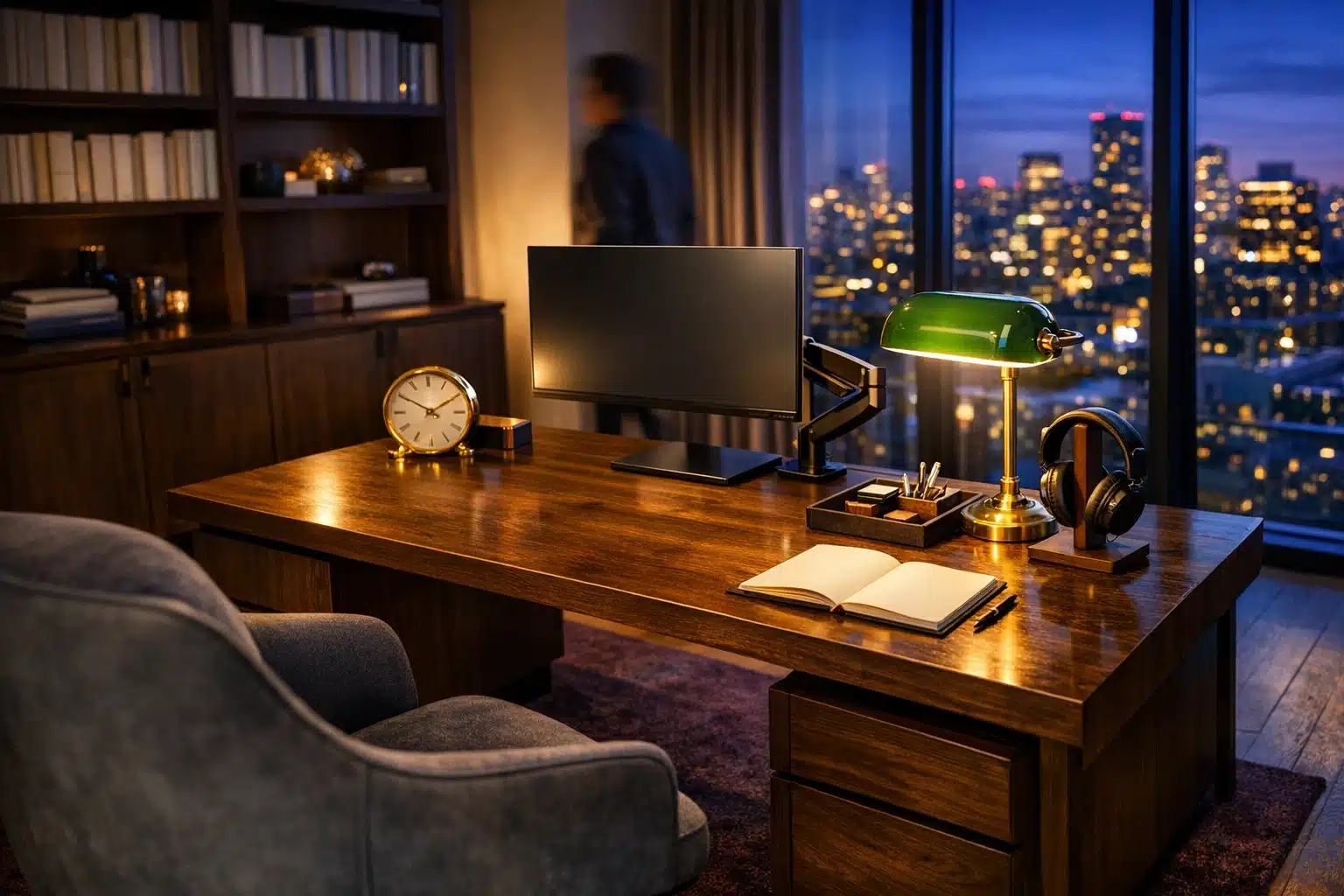
A monitor arm to free desk space and improve screen height
-
A desk mat that defines the work zone and protects the surface
-
A headphone stand to stop devices from wandering across the desk
-
A small drawer unit or rolling cart for flexible storage
-
A timer or analog clock to support focus blocks and breaks
There is also value in sensory comfort. Soft background texture, a quiet fan, or a plant within view can make the environment feel less mechanical. Just avoid piling on accessories because they look productive. A desk covered in gadgets can become another form of clutter, only more expensive. The strongest setups make work easier in ways you notice through less tension, fewer adjustments, and a smoother rhythm from morning to evening.
5. Conclusion: Building a Desk Setup You Will Actually Enjoy Using
For anyone trying to improve a work-from-home routine, the most helpful lesson is this: a better office does not start with decoration, and it does not require a huge budget. It starts with honest observation. Notice where your current setup slows you down, where discomfort appears, what keeps going missing, and which tasks need more room or better tools. Once those patterns become clear, every design choice has a purpose. The desk stops being a random collection of objects and starts acting like a reliable work partner.
If your space is small, focus on layout and vertical storage before buying more accessories. If your desk constantly gathers clutter, organize by how often you use each item and create a short reset habit at the end of the day. If the room feels dull or makes you reluctant to sit down, borrow inspiration from styles you genuinely like rather than chasing what is currently fashionable. Warmth, clarity, and personality can all exist together. The most effective home offices are rarely the most expensive; they are the ones where every detail earns its keep.
There is also no rule saying the setup must be finished in one weekend. In fact, gradual improvement is often smarter. You might begin with lighting, then fix monitor height, then add drawer dividers, then upgrade the chair when the time is right. Each step builds on the last. This slower process has an advantage: it lets you test what truly improves your day instead of filling the room with solutions to problems you do not actually have.
For remote workers, students, freelancers, and anyone managing tasks from home, a well-designed desk can offer more than efficiency. It can create a sense of readiness, reduce mental clutter, and make the workday feel less improvised. A strong setup will not answer every email for you or remove every deadline, but it can give your attention a calmer place to land. And sometimes that quiet support is exactly what turns a chaotic corner into a space where good work begins.